Network Address Translation Explained: How NAT Lets Private IPs Reach the Internet
Every phone, laptop, and smart TV in your home has an IP address, yet almost none of them can be reached directly from the internet. Instead, they all share a single public address. This trick is called network address translation, and it quietly keeps the modern internet running. In this guide, we explain how network address translation works, which types exist, how to configure them on a router, and how to fix the most common problems.
What Is Network Address Translation?
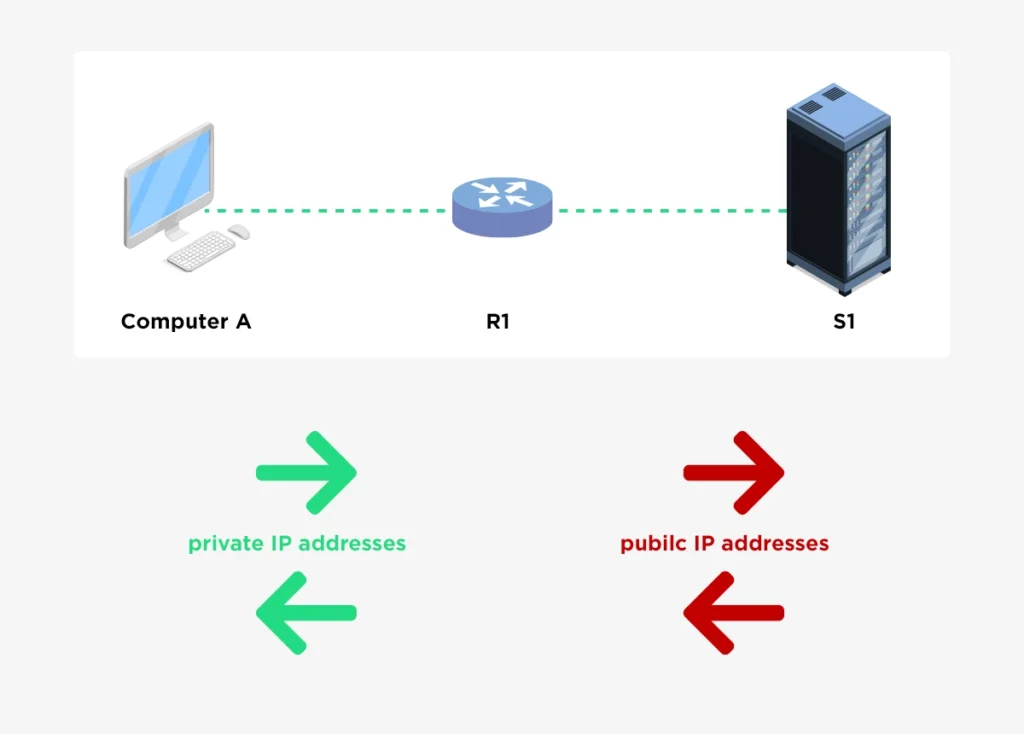
Network address translation (NAT) is a method that lets a router rewrite the IP addresses in packets as they cross from one network to another. Typically, the router sits between a private network and the internet. It replaces the private source address of each outgoing packet with a public one, and it reverses the change for the replies. As a result, hundreds of devices can share one public address without any of them noticing.
NAT was created to slow down the exhaustion of IPv4 addresses. IPv4 offers only about 4.3 billion addresses, which is far fewer than the number of connected devices today. Therefore, instead of giving every device a unique public address, networks reuse private ranges internally and translate at the edge.
Why Private IP Addresses Cannot Cross the Internet
RFC 1918 reserves three address blocks for private use:
| Block | Range | Typical use |
|---|---|---|
| 10.0.0.0/8 | 10.0.0.0 to 10.255.255.255 | Large enterprises and data centers |
| 172.16.0.0/12 | 172.16.0.0 to 172.31.255.255 | Medium networks |
| 192.168.0.0/16 | 192.168.0.0 to 192.168.255.255 | Homes and small offices |
Anyone can use these addresses, and millions of networks do. Consequently, internet routers do not forward them. If your laptop sent a packet with the source 192.168.1.10 straight to a web server, the reply would have nowhere to go, because the same address exists in countless other networks. That is exactly the gap network address translation fills.
How Network Address Translation Works Step by Step
Consider a PC at 192.168.1.10 that opens a web page on a server at 198.51.100.20. The router has the public address 203.0.113.2 on its outside interface.
- The PC sends a packet with source 192.168.1.10 and destination 198.51.100.20.
- The router receives it on its inside interface and checks its NAT rules.
- The router rewrites the source address to 203.0.113.2, and it records the change in a translation table.
- The server replies to 203.0.113.2.
- The router looks up the entry in its table, rewrites the destination back to 192.168.1.10, and forwards the reply to the PC.
Because the router remembers each conversation, replies always find their way home. However, an unsolicited packet from the internet has no matching entry, so the router normally drops it.
Network Address Translation Terminology
Cisco documentation uses four terms that confuse many beginners. In the example above, they map like this:
| Term | Meaning | Example |
|---|---|---|
| Inside local | The private address of the inside host | 192.168.1.10 |
| Inside global | The public address that represents the inside host | 203.0.113.2 |
| Outside local | The outside host as seen from the inside | 198.51.100.20 |
| Outside global | The outside host as seen on the internet | 198.51.100.20 |
Usually, the two outside addresses are identical. Still, learning the four terms makes the output of show ip nat translations much easier to read.
Types of Network Address Translation
There are three main types, and each solves a different problem.
Static NAT
Static NAT creates a permanent one-to-one mapping between a private address and a public address. For example, a web server at 192.168.1.10 can always appear as 203.0.113.10. This type is ideal for servers that must be reachable from the internet. On the other hand, it needs one public address per mapped device, so it does not scale.
Dynamic NAT
Dynamic NAT maps inside hosts to addresses taken from a pool of public addresses. When a host starts sending traffic, the router assigns it a free address from the pool. After the entry times out, the address returns to the pool. The key limit is the pool size: once every public address is in use, new hosts cannot get out until an entry expires. In practice, this type is rare today.
PAT (NAT Overload)
Port address translation (PAT), also called NAT overload, is by far the most common type of network address translation. It lets many hosts share a single public address by giving each conversation a different source port. A simplified translation table looks like this:
| Protocol | Inside local | Inside global | Outside global |
|---|---|---|---|
| TCP | 192.168.1.10:51000 | 203.0.113.2:1025 | 198.51.100.20:443 |
| TCP | 192.168.1.11:51002 | 203.0.113.2:1026 | 198.51.100.20:443 |
| UDP | 192.168.1.12:40000 | 203.0.113.2:1027 | 192.0.2.53:53 |
Notice that all three hosts share 203.0.113.2, and only the port numbers differ. Since each public address offers tens of thousands of ports, one address can serve a large number of simultaneous sessions. Home routers and small-office firewalls use PAT almost exclusively.
Network Address Translation Configuration Example
The examples below use Cisco IOS syntax. The addresses come from ranges reserved for documentation, so they are safe for practice.
Configuring PAT on One Interface
Suppose the inside network is 192.168.1.0/24 and the router has one public address on its outside interface.
interface gigabitethernet0/0
 ip address 192.168.1.1 255.255.255.0
 ip nat inside

interface gigabitethernet0/1
 ip address 203.0.113.2 255.255.255.252
 ip nat outside

access-list 1 permit 192.168.1.0 0.0.0.255
ip nat inside source list 1 interface gigabitethernet0/1 overload
Here, the access list decides which hosts may be translated, and the final command ties that list to the outside interface with the overload keyword. If you forget either ip nat inside or ip nat outside, nothing is translated.
Configuring Static and Dynamic NAT
For a server that must be reachable from the internet, use a static mapping:
ip nat inside source static 192.168.1.10 203.0.113.10To publish only one service, such as HTTPS, a static port mapping works better:
ip nat inside source static tcp 192.168.1.10 443 203.0.113.2 443For dynamic NAT, define a pool and link it to an access list:
ip nat pool PUBLIC-POOL 203.0.113.10 203.0.113.20 netmask 255.255.255.0
access-list 1 permit 192.168.1.0 0.0.0.255
ip nat inside source list 1 pool PUBLIC-POOL
Verifying the Configuration
Afterward, confirm that translations appear:
show ip nat translations
show ip nat statistics
clear ip nat translation *
The first command lists active entries, the second shows hit and miss counters, and the third clears the table, which is useful after a configuration change. Use debug ip nat only briefly, and never during peak hours on a production router, because it can overload the CPU.
Is Network Address Translation a Security Feature?
Many people believe NAT protects a network, and the belief is understandable. Because the router drops unsolicited inbound traffic that has no table entry, internal hosts do look hidden. However, that behavior is a side effect, not a security design. NAT does not inspect traffic, block malware, or stop an infected PC from connecting outward. Moreover, a static mapping or port forward opens a direct path to the internal host.
Therefore, treat NAT as an addressing tool, and rely on a real stateful firewall for protection. Ideally, use both together.
Troubleshooting Network Address Translation Problems
When users report that they cannot reach the internet, start with the translation table and the interface roles. The table below covers the most common faults.
| Symptom | Likely cause | What to check |
|---|---|---|
| No translations appear | Missing or swapped ip nat inside and ip nat outside | Run show ip nat statistics and review the interface roles |
| Some hosts work, others do not | The access list does not match every host | Review the ACL and its wildcard mask |
| Translations appear, but replies never arrive | Routing problem on the outside or at the provider | Test the default route and ping outward from the router |
| Dynamic NAT fails after a while | The public pool is exhausted | Enlarge the pool or switch to PAT |
| Pool range overlaps an interface address | Misconfigured pool | Make sure pool addresses do not include the router’s own |
| Old entries cause odd behavior | Stale translations | Run clear ip nat translation * |
Keep in mind that entries do not disappear when a session ends. They stay until an idle timer expires. TCP entries can last for hours by default, while UDP and DNS entries expire within minutes or less. Consequently, a stale entry can explain strange behavior right after a change.
Common NAT Limitations With VoIP, VPN and Games
Some protocols place IP addresses inside the data itself, and plain network address translation does not rewrite them. As a result, active FTP, SIP voice calls, and some online games may fail. Several tools help:
- Application layer gateways (ALGs) inspect and rewrite embedded addresses for known protocols.
- STUN and ICE let two devices discover their public address and find a working path, which is common in video calls.
- NAT-T wraps IPsec traffic in UDP port 4500, so VPN tunnels survive translation.
- Port forwarding opens a fixed path to a chosen internal host.
Likewise, two users behind different NAT devices often struggle to connect directly, so peer-to-peer applications frequently use a relay server.
Carrier-Grade NAT and the Move to IPv6
Because IPv4 addresses are so scarce, many internet providers now place another layer of NAT inside their own networks. This approach, called carrier-grade network address translation (CGNAT), commonly uses the shared range 100.64.0.0/10. Customers then sit behind two translations, which makes port forwarding impossible and can cause shared-address problems, such as blocked services.
IPv6 solves the root cause by offering a vastly larger address space, so every device can have a unique public address. In the meantime, transition tools such as NAT64 help IPv6-only networks reach IPv4 services. Even so, NAT will remain common for many years.
Best Practices for Stable NAT Deployments
A few habits keep every network address translation deployment stable and easy to support.
- Pick the right type. Use PAT for general internet access, and static NAT only for published servers.
- Label interfaces clearly. Document which interface is inside and which is outside.
- Keep ACLs tight. Translate only the networks that need internet access.
- Plan your pool. If you use dynamic NAT, size the pool for peak demand.
- Add a firewall. Never rely on NAT alone for protection.
- Monitor the table. A sudden surge of entries can reveal a scan or an infected host.
- Avoid overlap. When you merge networks, check for duplicate private ranges before connecting them.
Final Thoughts on Network Address Translation
In short, network address translation lets private networks share scarce public addresses by rewriting packets at the edge and tracking each conversation in a table. Static NAT publishes servers, dynamic NAT hands out addresses from a pool, and PAT lets thousands of hosts share one address. Therefore, learn the four address terms, practice the PAT lab above, and always pair NAT with a firewall. With those basics in place, network address translation will stop feeling mysterious, and troubleshooting it will become routine.